Read Article
The CLAT application form 2027 is available online for candidates seeking admission to undergraduate (UG) and postgraduate (PG) law programmes at participating National Law Universities (NLUs). The application process includes registration, programme selection, personal and academic details, document uploads, test-centre preferences, and fee payment. The application fee is ₹4,000 for General/OBC candidates in UG and General/OBC/NRI candidates in PG, and ₹3,500 for SC/ST/BPL/PwD candidates.
UG and PG applicants follow the same basic CLAT 2027 registration process, but their eligibility criteria and qualifying examination details differ. UG candidates must meet the Class 12 requirements, while PG candidates must meet the requirements for an LL.B. degree or an equivalent qualification. Check the programme-specific instructions before submitting the form.
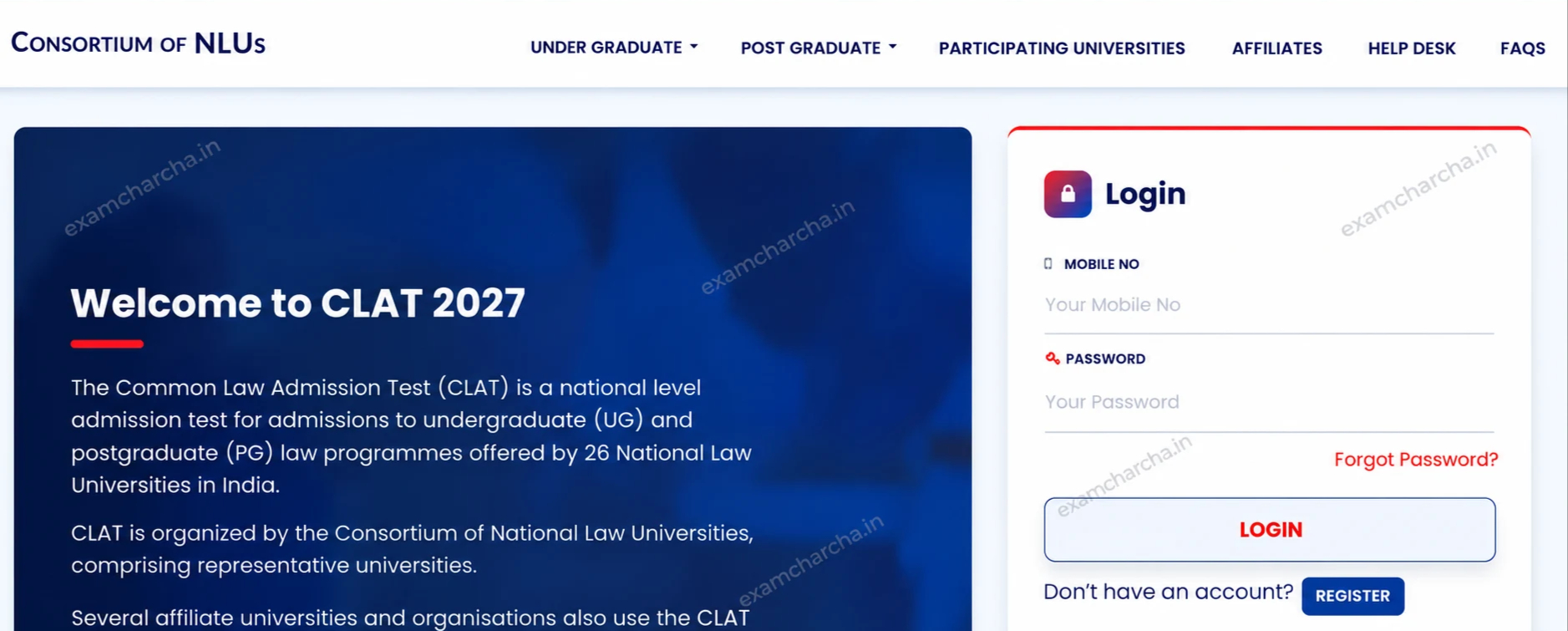
The first step in the CLAT registration process is to create an account on the official website. Candidates must register before accessing the application form.
Follow the registration steps for CLAT 2027:
Use an active mobile number and an email address that you check regularly. The Consortium may use the registered details for application updates and candidate login. The CLAT 2027 registration deadline is October 31, 2026, at 11:59 PM. Complete the application form and fee payment before the deadline.
Check the spelling of your name and your parents' names against your certificates, mark sheets, or identity proof. The Consortium warns that changes or alterations to names may lead to disqualification. Save your login credentials for future access.
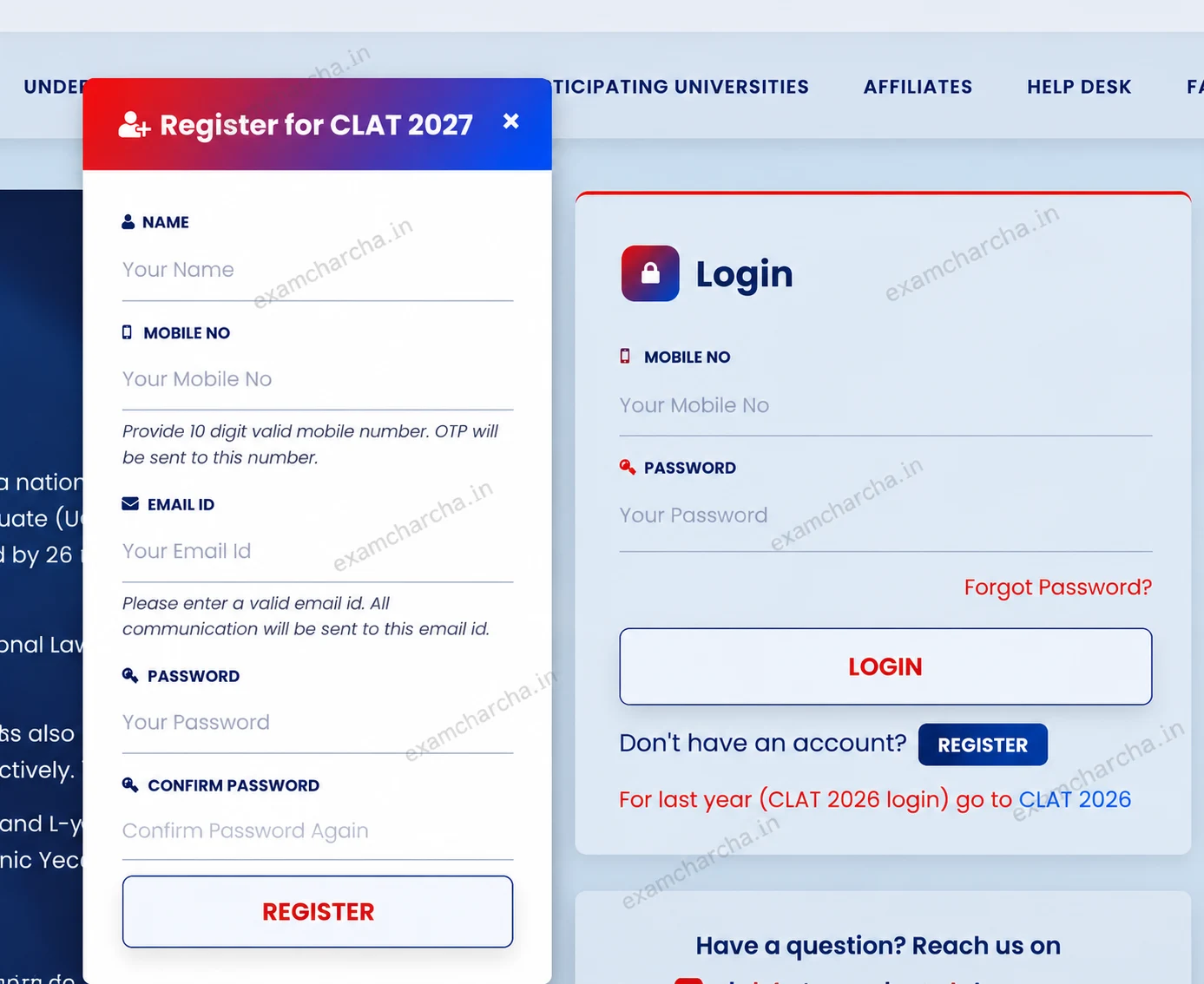
After registration, open the CLAT candidate login page and sign in using your registered credentials. Select the correct programme before proceeding with the application.
|
Programme |
Who Should Select It? |
|
CLAT UG (Undergraduate) |
Candidates applying for undergraduate law programmes |
|
CLAT PG (Postgraduate) |
Candidates applying for postgraduate law programmes |
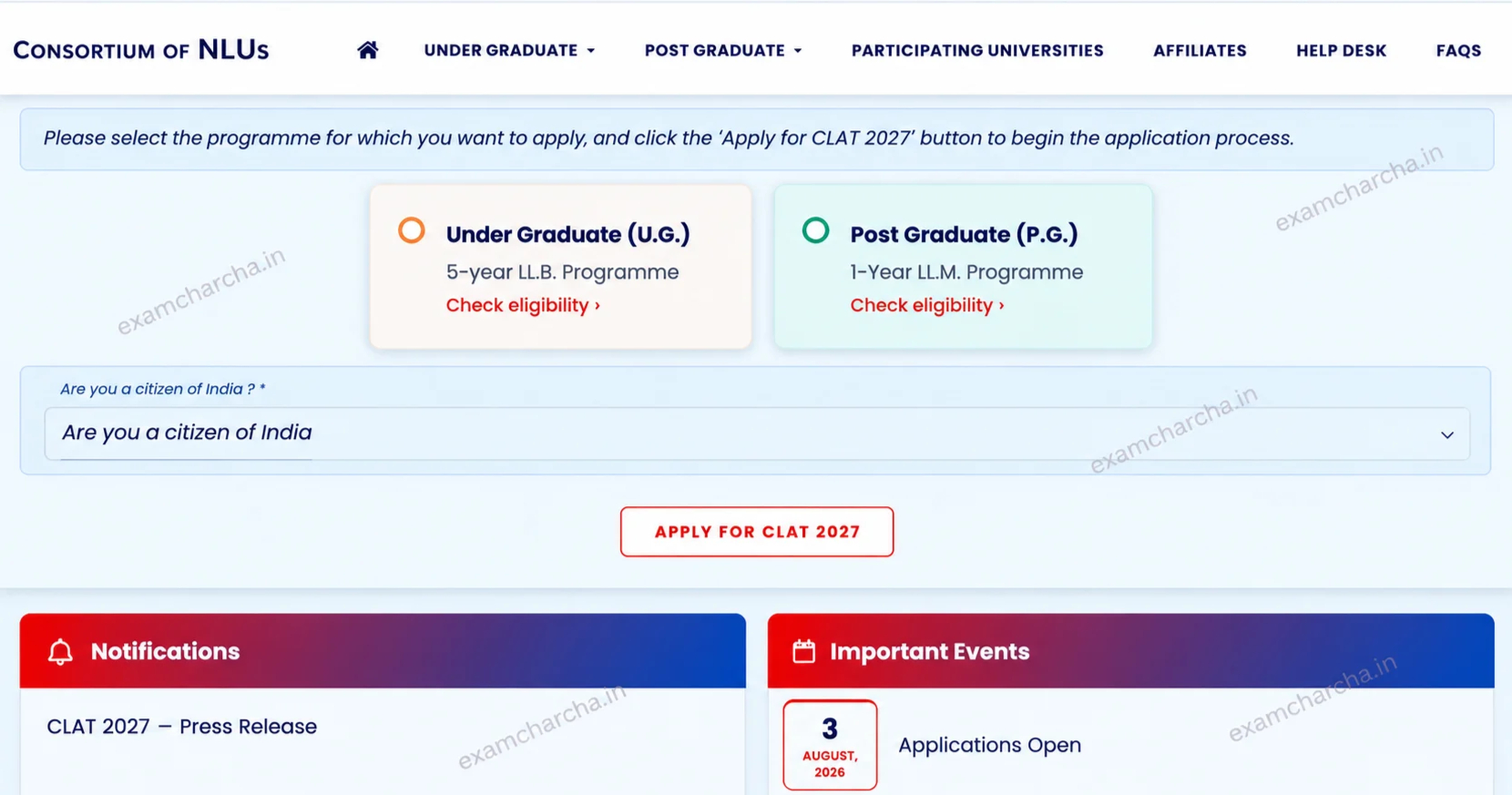
The Consortium does not accept requests to change the programme after submission and payment. UG applicants should not select PG, and LL.M. applicants should select PG.
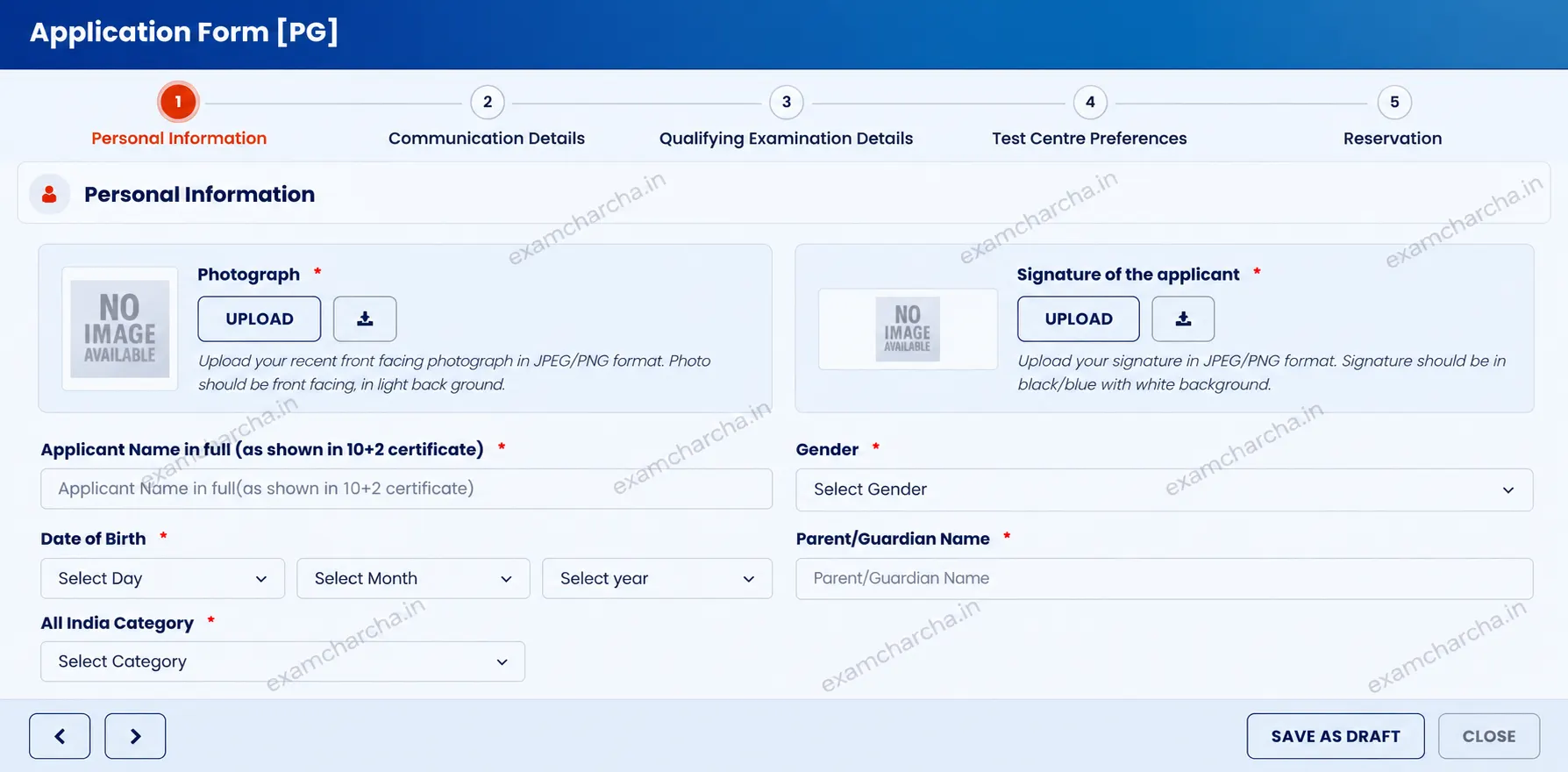
Prepare the CLAT 2027 documents required for registration before completing the application form. According to the official instructions, you must upload the following documents, as applicable:
Check the live application form for additional instructions relevant to your application.
Upload a recent, front-facing passport-size photograph with a plain background. The photograph should clearly show your face and follow the instructions displayed on the official portal.
The official CLAT 2027 instructions require documents and certificates to be uploaded in PDF format. Follow the current portal's requirements for preparing and uploading your photograph. Do not rely on previous-year JPG/PNG or file-size specifications unless the current portal confirms them.
Prepare a clear signature according to the application instructions. The official guidelines state that your photograph and signature do not require attestation for online submission.
Check the live application form for field-specific instructions before uploading your signature.
You must submit original certificates and documents to the allotted university in the form and manner specified by that university at admission. Uploading a certificate during registration does not remove the requirement to produce the original document later.
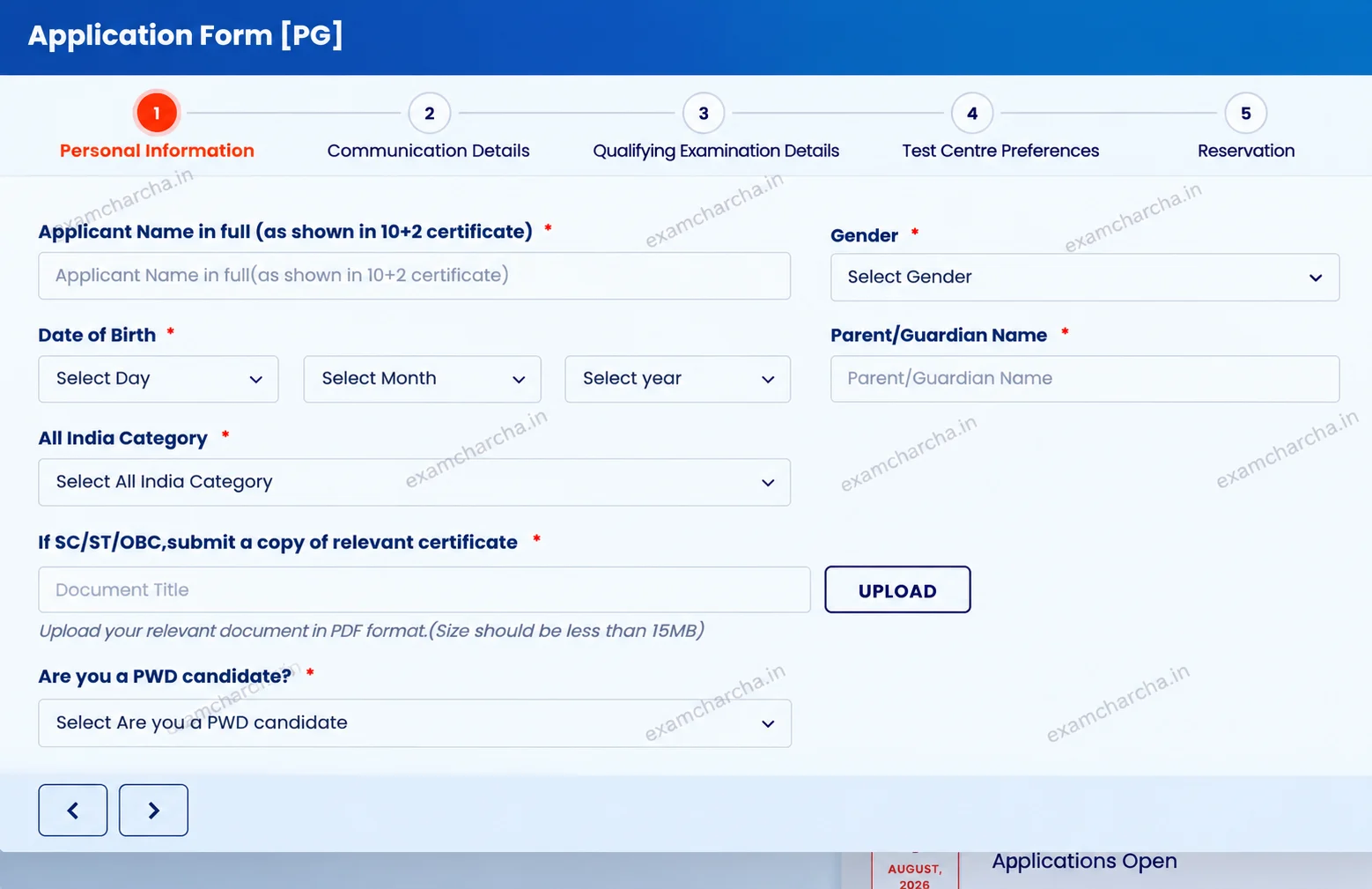
Complete every mandatory field in the CLAT application form 2027 accurately. The personal details section may ask for information such as your name, gender, date of birth, and parent or guardian's name.
|
Personal Detail |
Information to Enter |
|
Name |
Enter your name according to the form instructions and supporting documents. |
|
Gender |
Select the applicable option. |
|
Date of Birth |
Enter the correct day, month, and year. |
|
Parent or Guardian's Name |
Provide the requested details. |
|
Signature |
Upload your signature in the specified field. |
Check the spelling of your name and your parents' names against your official documents. A star (*) beside a field indicates that the information is compulsory. Complete all mandatory fields before proceeding.
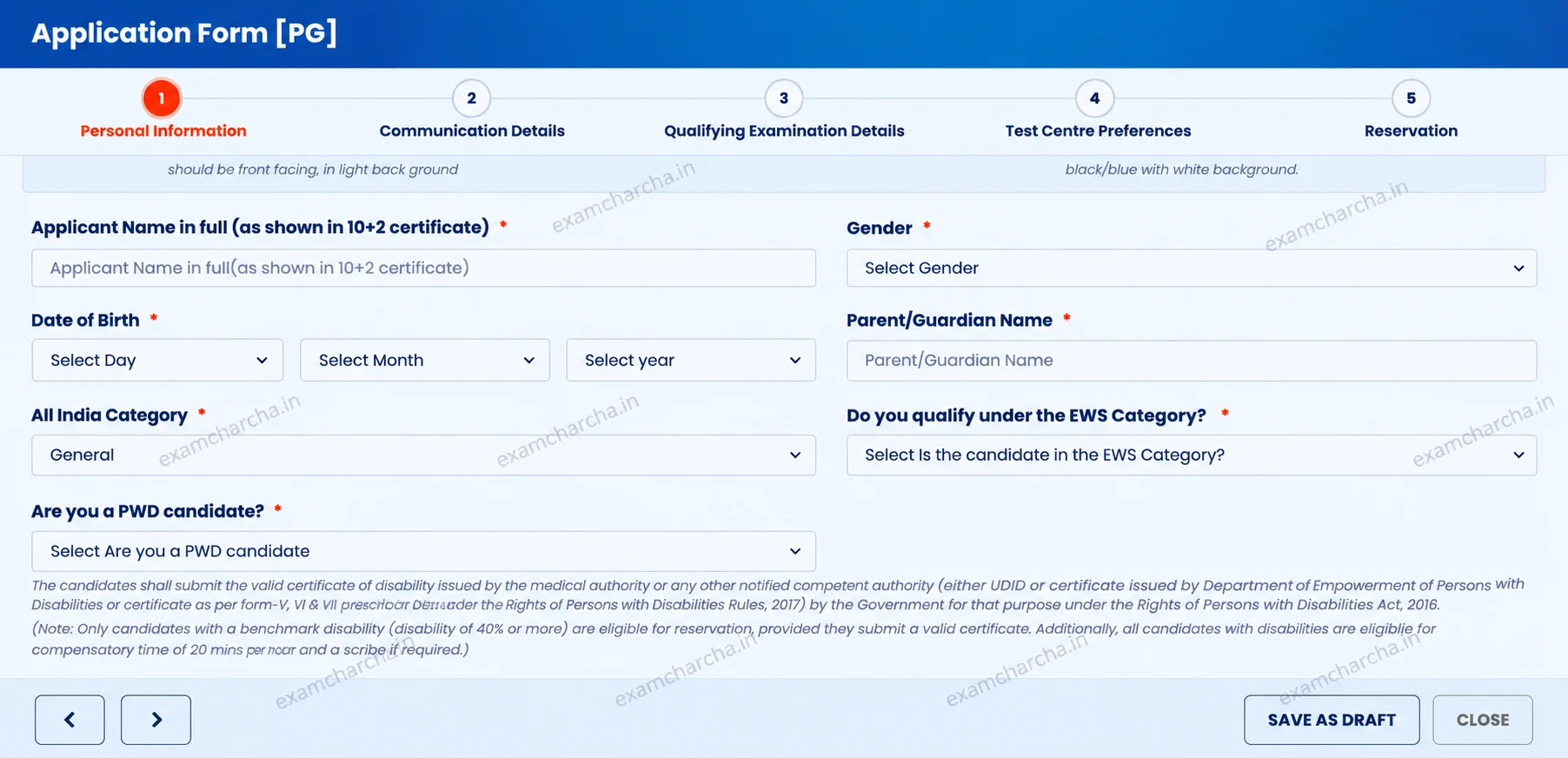
Select your category according to your actual status and the applicable eligibility requirements. The official CLAT 2027 instructions identify SC/ST/OBC category certificates, PwD certificates, and BPL certificates among the documents that may be required.
The available category options and reservation benefits may also depend on the admission policies of participating NLUs. Review the applicable options before making your selection.
Select Economically Weaker Section (EWS), creamy-layer, or non-creamy-layer status only if the live application form displays the relevant option and the selection applies to your circumstances.
Your category certificate must meet the requirements of the Government of India or the applicable State Government and the participating university. Check the official instructions to confirm which documents you must upload and produce at admission.
Important: You cannot change your programme, category, or BPL field after submitting the application and paying the fee. Verify your selections before final submission.
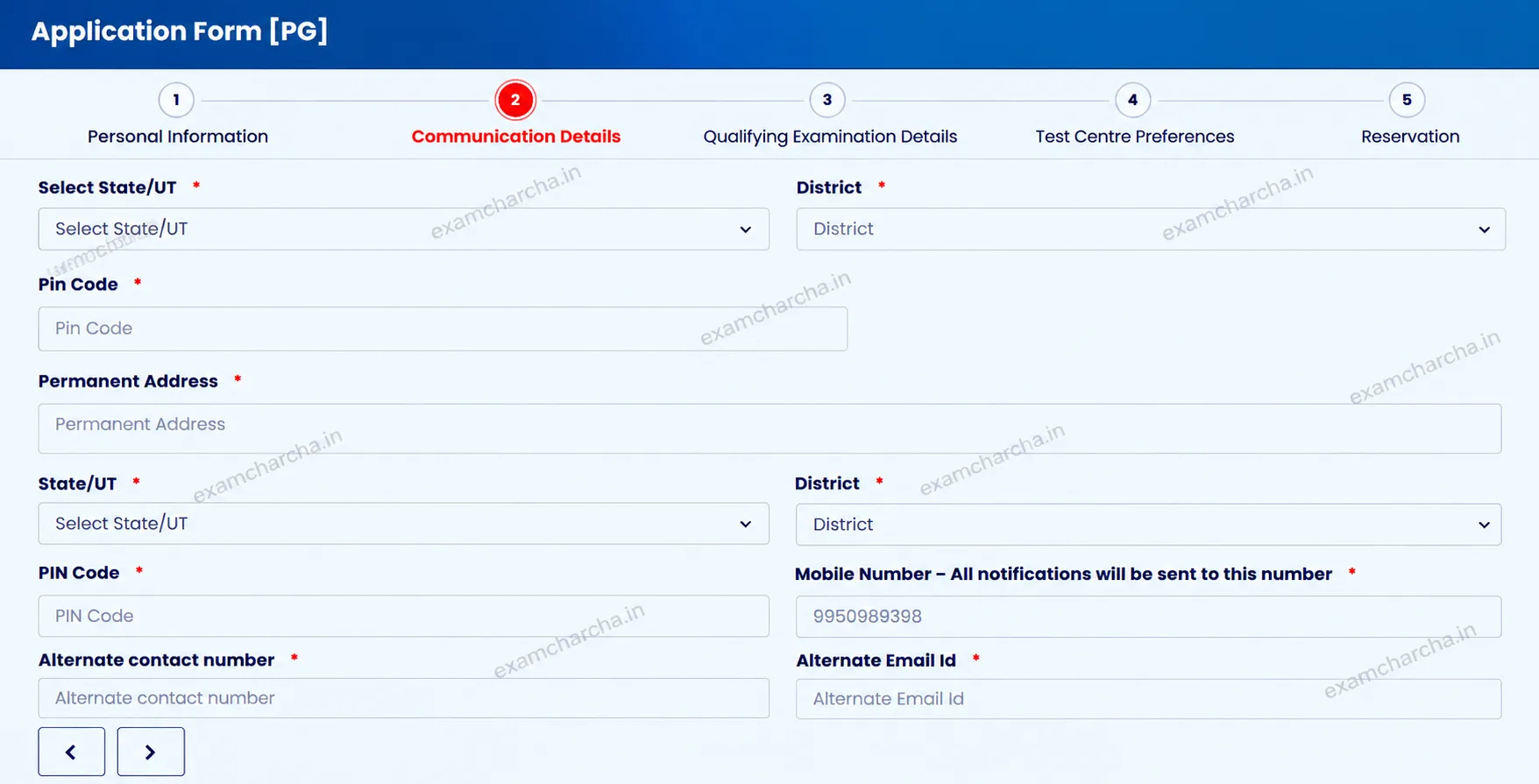
Enter your correspondence and permanent addresses in the communication section. Your correspondence address is where you currently live or want to receive official communication, while your permanent address is your permanent residential address.
For example, if you currently live in Hyderabad but your permanent home is in Jaipur, enter the two addresses separately.
Complete the fields requested on the portal, including:
If both addresses are the same, follow the portal's instructions for copying or entering the details. Check your contact information carefully because the Consortium may use your registered mobile number and email address for application updates.
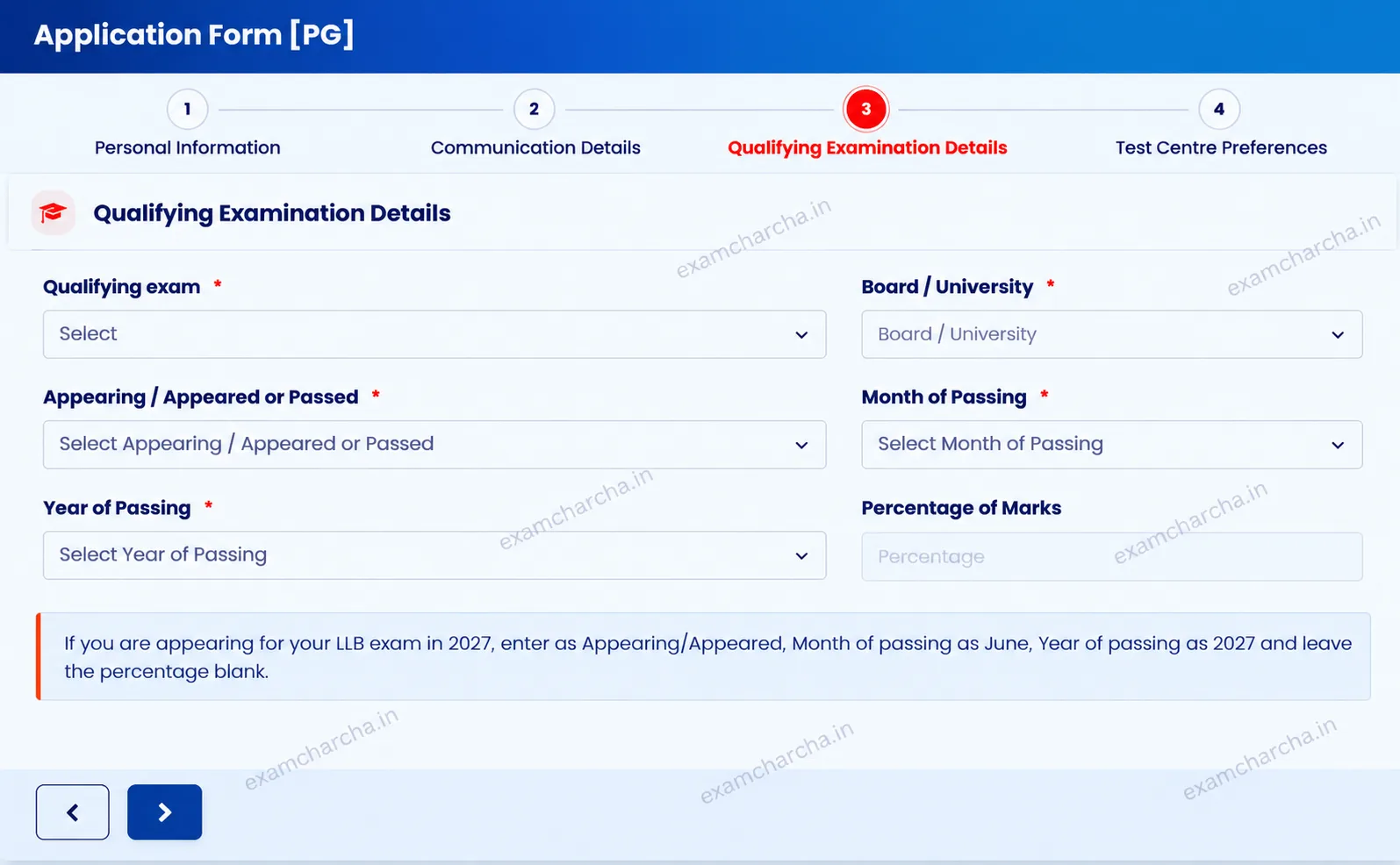
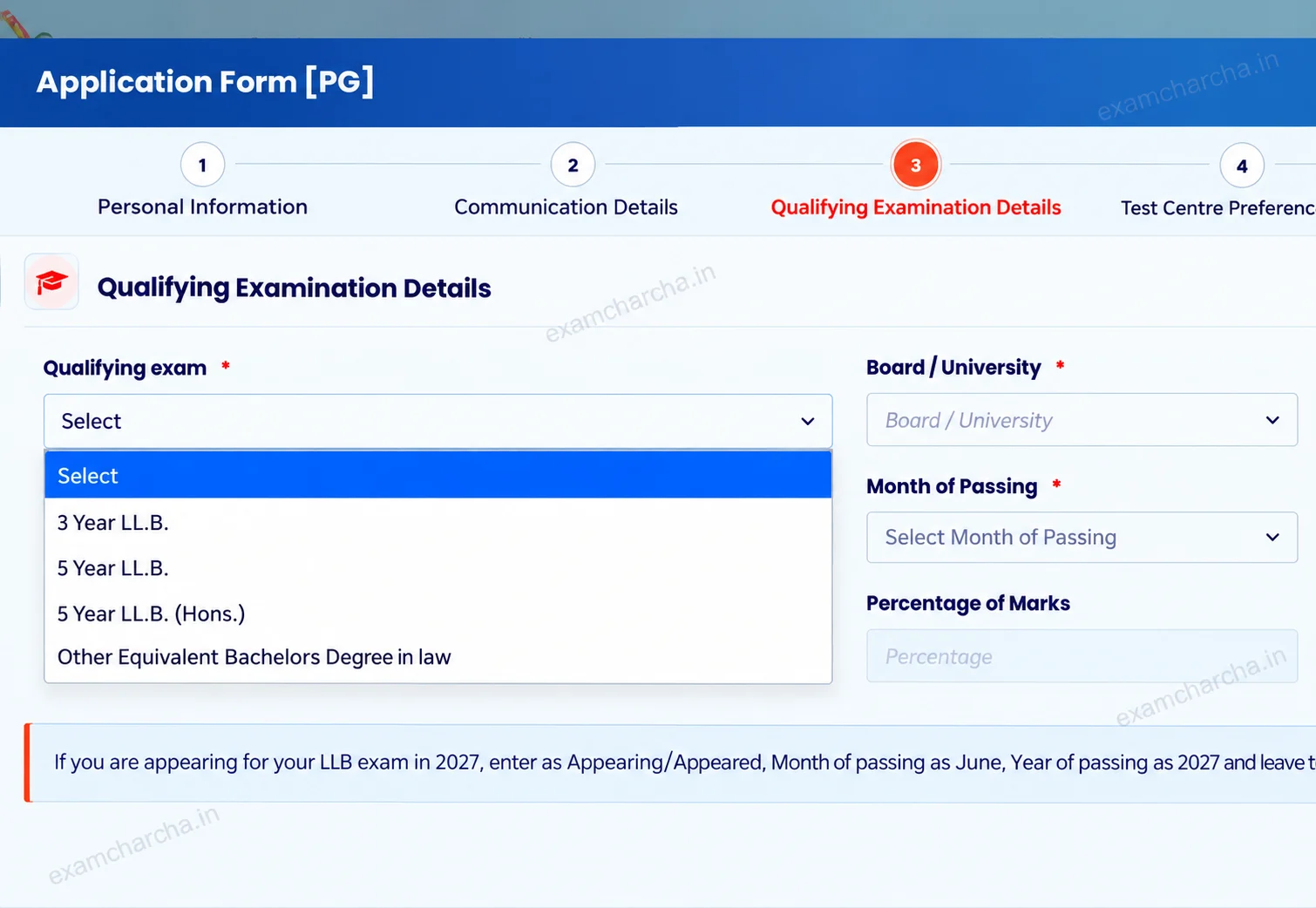
The academic details section differs for UG and PG applicants. UG candidates must enter information about their Class 12 qualification, while PG candidates must provide details of their LL.B. degree or equivalent qualification.
UG applicants should enter their Class 12 academic details according to their records. The form may ask for:
|
Academic Detail |
Information to Enter |
|
Qualifying Examination |
Class 12 or an equivalent examination. |
|
Academic Board |
Select or enter the relevant board. |
|
School or Institution |
Enter the name of your school or institution, if requested. |
|
Passing Status |
Select the applicable status according to the form. |
|
Passing Year |
Enter the year of passing or expected completion, as applicable. |
|
Marks or Percentage |
Enter your marks or percentage according to the form instructions. |
Check the details against your academic records before proceeding. Candidates appearing for their qualifying examination in March or April 2027 may apply, subject to the prescribed eligibility requirements. You must provide evidence of passing the qualifying examination at admission.
PG applicants should enter their LL.B. degree or equivalent qualification details according to their academic records. The form may ask for:
|
Academic Detail |
Information to Enter |
|
Qualifying Examination |
LL.B. degree or an equivalent qualification. |
|
Degree Type |
Select the applicable degree or qualification. |
|
University or Institution |
Enter the name of the university or institution. |
|
Passing Status |
Select the applicable passed or appearing option. |
|
Passing Month and Year |
Enter the month and year of passing or expected completion, as applicable. |
|
Marks or Percentage |
Enter your marks or percentage according to the form instructions. |
Yes. Candidates appearing for their qualifying examination in 2027 can apply, subject to the prescribed eligibility requirements. They must provide evidence of passing the qualifying examination at admission. Failure to provide the required evidence can result in the loss of eligibility for admission.
If you have completed your LL.B., select the passed option and enter the requested details. If you are in your final year, select the applicable appearing option according to the wording of the form. Enter your expected passing month and year accurately. Leave the percentage field blank only if the official form instructions permit you to do so.
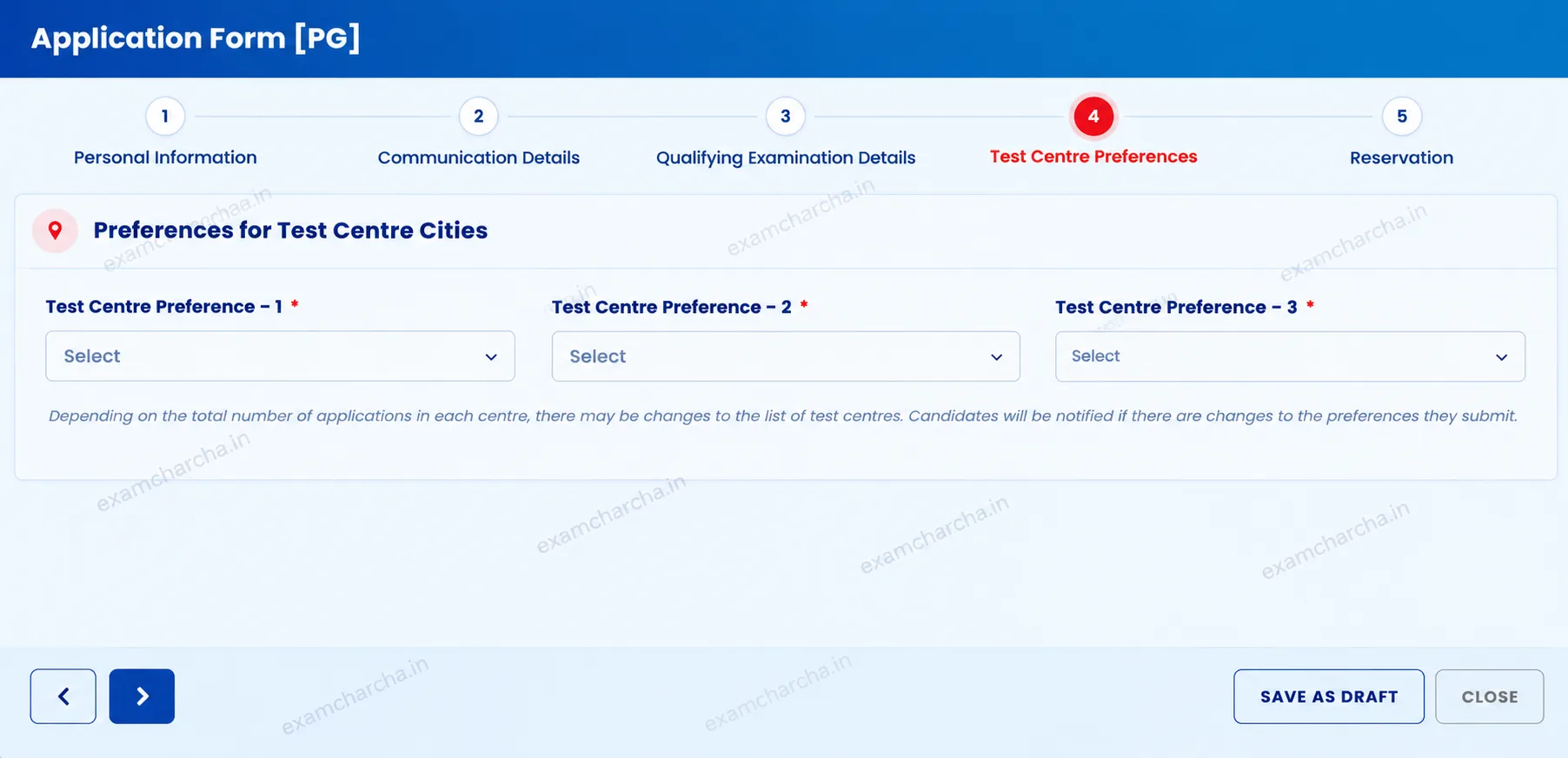
After entering your academic details, select your preferred test-centre cities. The application form may ask you to rank multiple preferences. Check the live portal to confirm the number of preferences required for CLAT 2027.
Follow the given steps to select your preferred examination centres:
|
First Preference |
Select your current city, if available. |
|
Second Preference |
Choose a nearby city that is convenient to reach. |
|
Third Preference |
Select another practical alternative, if requested. |
You can use these three preferences as a starting point when planning your choices. Check the live application form to confirm how many cities you can select, as the available options may differ for CLAT 2027.
For example, if you live in Jaipur, you may select Jaipur as your first preference and consider nearby cities as alternatives. If your city is unavailable, choose the nearest practical options.
Consider travel time and accessibility when ranking your preferences. Selecting a city as your first preference does not guarantee allotment because the final centre depends on the Consortium's allotment process and availability.
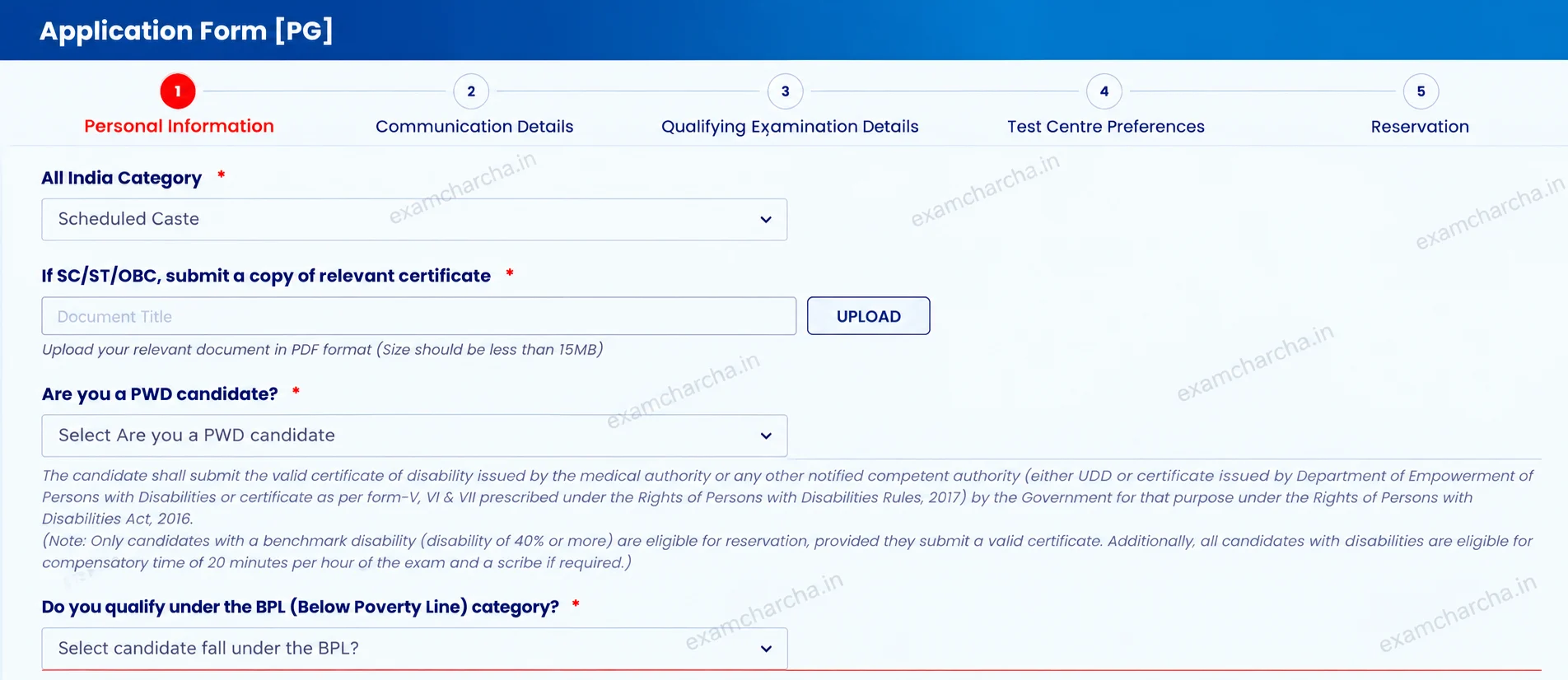
Before proceeding to payment, review your reservation details and supporting documents. If you are claiming reservation benefits, ensure that the information entered in your application matches your supporting certificates.
Check the following details:
Review your entries carefully because incorrect information or discrepancies between your application and supporting documents can affect your admission eligibility.
After completing the application sections, proceed to payment. You must pay the CLAT 2027 application fee online through the options available on the official portal.
The official instructions list the following application fees:
|
Programme |
Category |
Application Fee |
|
CLAT UG |
General/OBC |
₹4,000 |
|
SC/ST/BPL/PwD |
₹3,500 |
|
|
CLAT PG |
General/OBC/NRI |
₹4,000 |
|
SC/ST/BPL/PwD |
₹3,500 |
The cost of CLAT previous years' question papers is ₹500 and is separate from the application fee. Candidates must also bear applicable bank transaction charges. The application fee is non-refundable and non-adjustable.
Check the transaction status on the official portal and review the confirmation from your bank or payment provider. Avoid making another payment before checking the status of your first transaction.
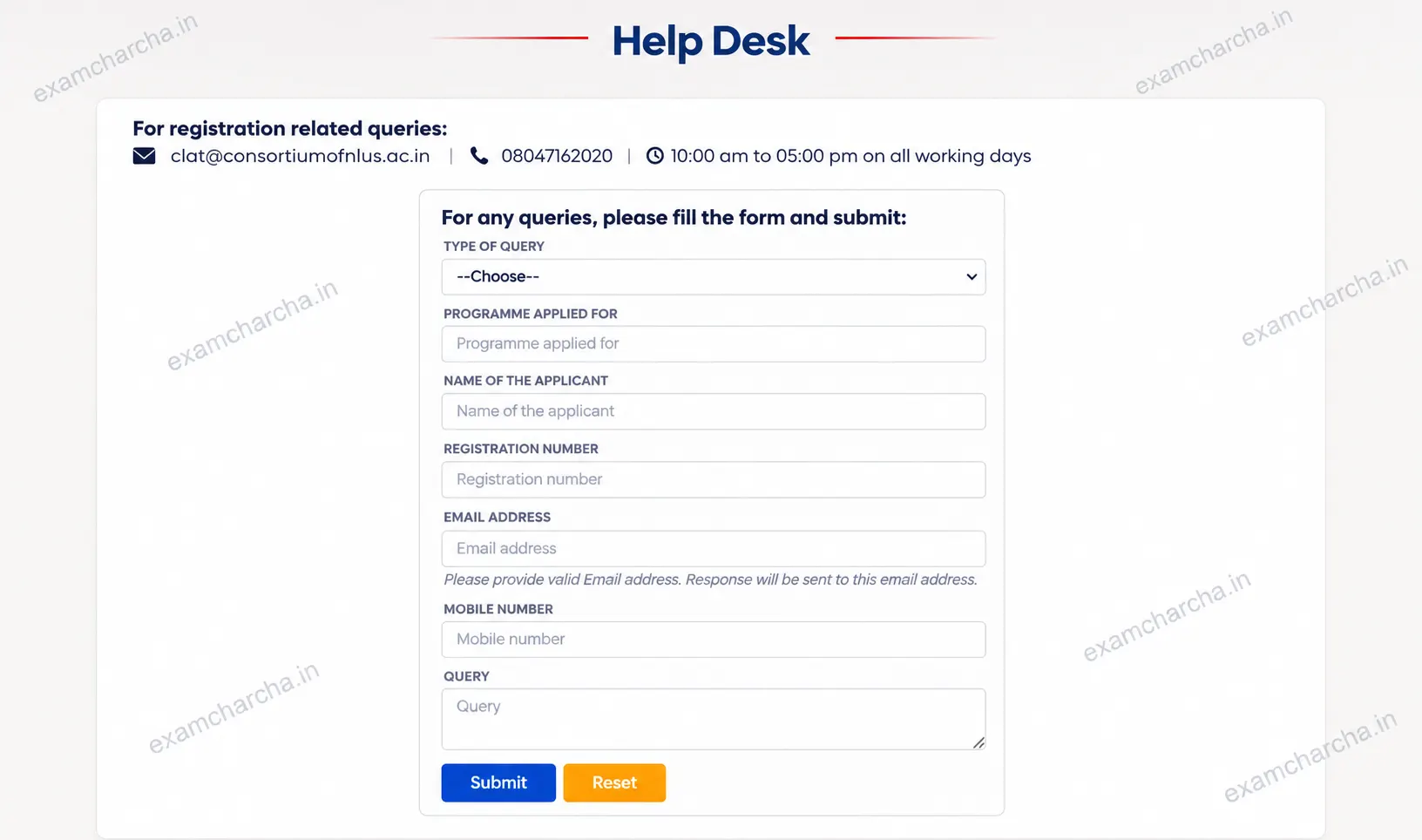
If the issue remains unresolved, contact the official CLAT help desk
clat@consortiumofnlus.ac.in or +08047162020, 10:00 am to 05:00 pm on all working days.
After completing the required application and payment steps, check for a confirmation message or email. Keep the following information accessible:
Store your application number securely. You may need your login details to access your admit card, result, and other examination updates.
Log in to the official CLAT portal consortiumofnlus.ac.in/clat-2027/ and check the information available in your candidate account. Follow the portal's instructions to confirm whether your application has been submitted successfully.
Open your candidate account and check the available application confirmation or receipt options. If the portal provides a downloadable confirmation, follow the displayed instructions and save the document for future reference.
The CLAT application process covers participating National Law Universities under the Consortium. National Law University Delhi conducts a separate entrance examination called the All India Law Entrance Test (AILET).
If you intend to apply to National Law University Delhi, check its separate admission notification and application process. Completing your CLAT application does not automatically register you for AILET.
Check the Complete CLAT 2027 Guide
| CLAT Exam Dates | CLAT Critical Reasoning |
| CLAT Current Affairs | Important GK Topics for CLAT |
| CLAT The Daily Hindu Analysis | How Many Hours to Study for CLAT |
Check the official schedule before completing your CLAT application form 2027. The announced dates are listed below..
|
Event |
Date |
|
CLAT 2027 Registration Begins |
August 3, 2026 |
|
CLAT Registration Last Date |
October 31, 2026, at 11:59 PM |
|
CLAT 2027 Examination Date |
December 6, 2026 |
|
CLAT 2027 Examination Time |
2:00 PM to 4:00 PM |
|
Examination Time for Eligible PwD Candidates |
2:00 PM to 4:40 PM |
Explore Complete Resources for CLAT 2027
| CLAT Marking Scheme | CLAT Subjects |
| CLAT Admit Card | CLAT Mock Test |
| CLAT Exam Pattern | CLAT Eligibility Criteria |
Do not assume that you can edit every field after submitting your form. Before final submission, review your programme selection, personal details, category, qualifying examination information, test-centre preferences, and payment details.
The Consortium states that candidates cannot change the programme, category, or BPL field after submitting the application and paying the fee. Updates to the application form will not be entertained after the registration deadline.
For updates about the CLAT application correction window 2027, follow the official notifications issued by the Consortium. Do not rely on unverified correction dates or assume that every field can be changed after submission.
Explore Complete Resources for CLAT 2027
| CLAT Marks vs Rank | CLAT UG vs PG |
| CLAT compulsory for law | CLAT Syllabus |
| CLAT Cut Off | CLAT Difficulty Level |
Explore CLAT exam guides, preparation tips, and important updates.
Let’s help you figure it out.
Share what you’re trying to decide, and get guidance on exams, colleges, courses and coaching options that fit your goals.